
If you find yourself copying, pasting, and manually editing the same prompt over and over just to change a single word or detail, you’re wasting valuable time. As someone who has spent over 20 years in the development world, I can tell you that the key to efficiency is simple: placeholders.
In this article, I’ll show you how to use prompt variables to turn a repetitive task into a streamlined, automated workflow.
What exactly are prompt variables?
Think of prompt variables as simple containers. Instead of writing a fixed piece of text, you use a placeholder—usually marked by double brackets like [[this]]—that gets replaced with specific data later. This technique isn’t some new “AI magic”; we developers have been using this logic in web development for decades to build dynamic websites and applications. It is basically the foundation of automation.
How it works in the real world
Imagine you need to create ten different banner ads for a campaign. The design, the font, and the general vibe stay the same, but the dimensions and the text change for each version. Instead of rewriting the prompt ten times, you create one “Master Prompt” with variables for the size, the headline, and the background. This makes the process simpley much faster and less prone to errors.
Why automation matters for everyone
You don’t need to be a coding expert or a backend developer to appreciate automation. By using variables, you reduce the “human error” factor. When you manually edit a prompt, it’s easy to accidentally delete a comma or a keyword that the AI needs to keep the style consistent. Variables act as a safety net, ensuring the “core” of your prompt remains untouched while only the necessary parts change.
Comparison of Workflows
| Feature | Manual Editing | Variable-Based Prompting |
|---|---|---|
| Speed | Slow (re-typing or hunting for text) | Instant (just swap the value) |
| Consistency | Low (easy to break the prompt) | High (the base prompt stays identical) |
| Scalability | Hard (tedious for 20+ variations) | Easy (perfect for high-volume tasks) |
Ready to try it out?
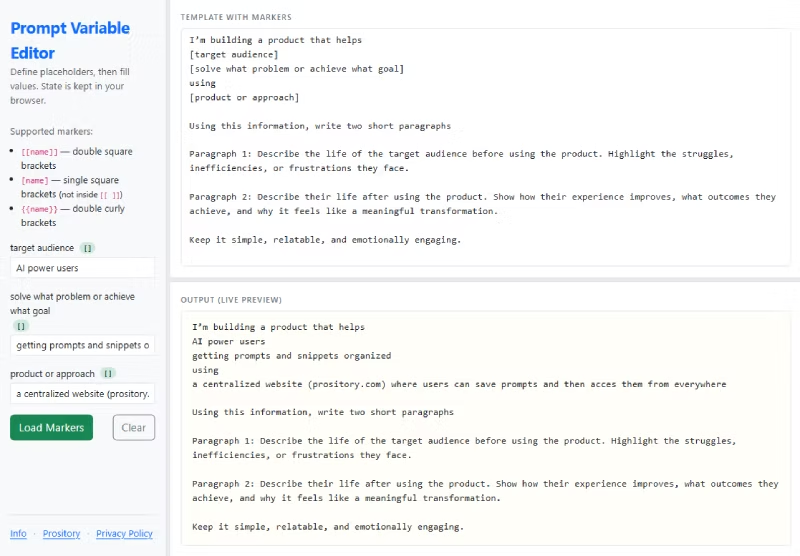
The best way to understand the power of variables is to see them in action. I’ve found a great tools where you can experiment with this logic yourself without needing to write a single line of code. A perfect sandbox for seeing how placeholders can transform your AI output:
Free Online Prompt Variable Editor
Check out the tool here: Prompt Variables Tester
Looking for some great Prompts to start with?
Check out this Complete Startup Prompt Library
It’s Your Turn
Variables are the first step toward a professional AI workflow. They save time, maintain consistency, and let you focus on the creative side of prompting rather than the mechanical editing. Once you start using them, you’ll never go back to the “old way” of manual copying and pasting.
What do you think? Have you tried using placeholders in your prompts yet, or do you prefer the manual touch? Let us know in the comments, share this article with your team, or subscribe to the RSS feed for more direct insights on making technology work for you.